Your Project schedule is set, every planning made. Now you get a call that the targeted Project start is delayed and you need to adjust the schedule.
Typical day to day business in Project Management
But what’s next? Doing all the handwork again?
No!
I will briefly show one Project Operations Feature nearly forgotten.
Projectplan
In our current scenario we create a very basic project plan, assign some resources, effort and add dependencies to it.
Not every task is linked. Therefore, adjusting to a new possible start of the project would inherit to adjust (in my sample) task 1 and 4.
Drag&Drop in the Timeline view can work for smaller projects.

Re-Schedule the project start
With Project Service Automation project managers where used to re-schedule project start within the App directly. Click a Button, set the new desired start date and the magic happened.
Unfortunate i did not find any screenshot about this or do not have a system anymore to show it.
BUT, this genius function still exists. OK, it might be a little bit hidden for the end user. Here we go:
“I would call it lost in translation”, while i see it at least at all my german customers and i would not be sure that even native english speakers would find out how it is working.
For all you folks, and while it is part of every pm training and demo i am giving the final hint:
The scheduled start date is used to set new "target" dates for your project tasks.
Scheduled Start
Now the confusion starts. At least for my customers, this is due to missing updates on this “field” when they start working with the WBS. When tasks are rescheduled this field might not be getting updated.
Often i get asked why there is a different date set as it is in the WBS.
Sample:
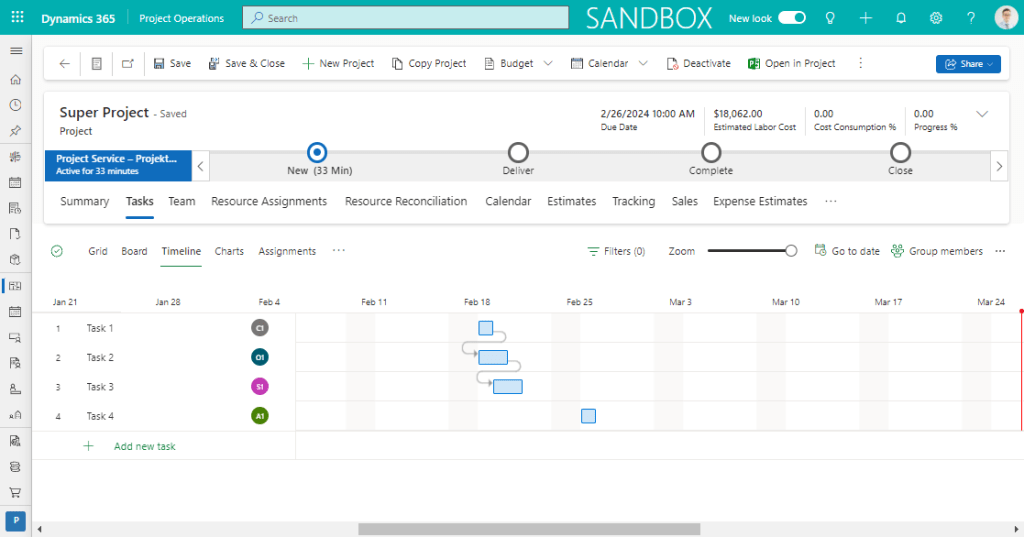
We did some edits with the dates and our entire project plan moved a little. Current expected project start would be the 19th feb.
Unfortunate our project estimate start field is not getting updated. It will stay with its old original value.
(Note) Sry, i already show it at a fixed form and not with a default one. I blured the unrelated parts.
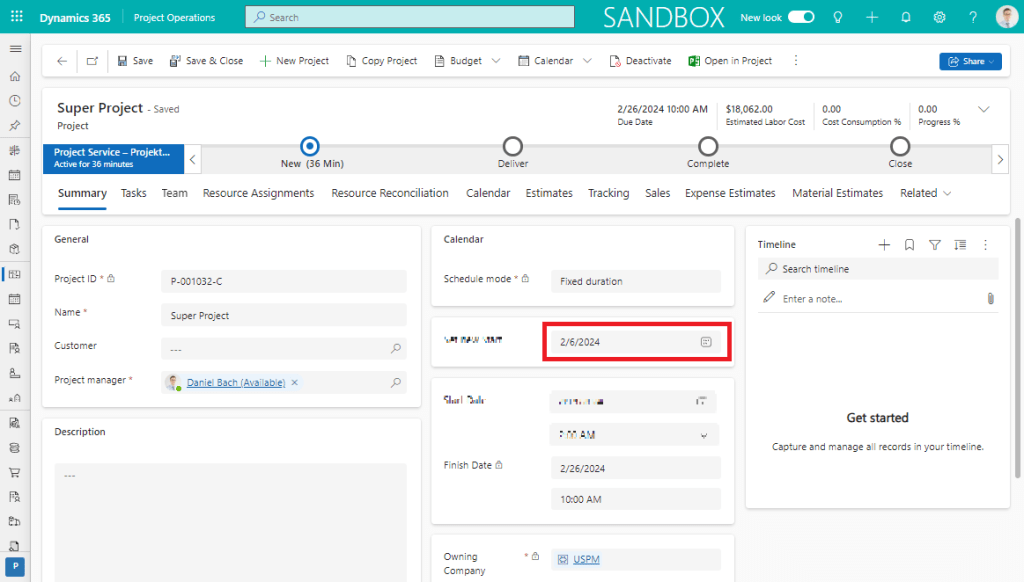
At the red box we can see that the scheduled start date field was not changed.
This is causing a lot of confusion at least in my projects for all the project managers.
But what can we do better?
If you want to directly see the solution switch to “Re-schedule” (Bottom Page, sry, WordPress N00B in place not able to set inpostlinks 😦 )
Pre-Re-schedule (make it nicer)
As a rule of thumb i prefer to clean up the form that the information to the project manager is clear enough.
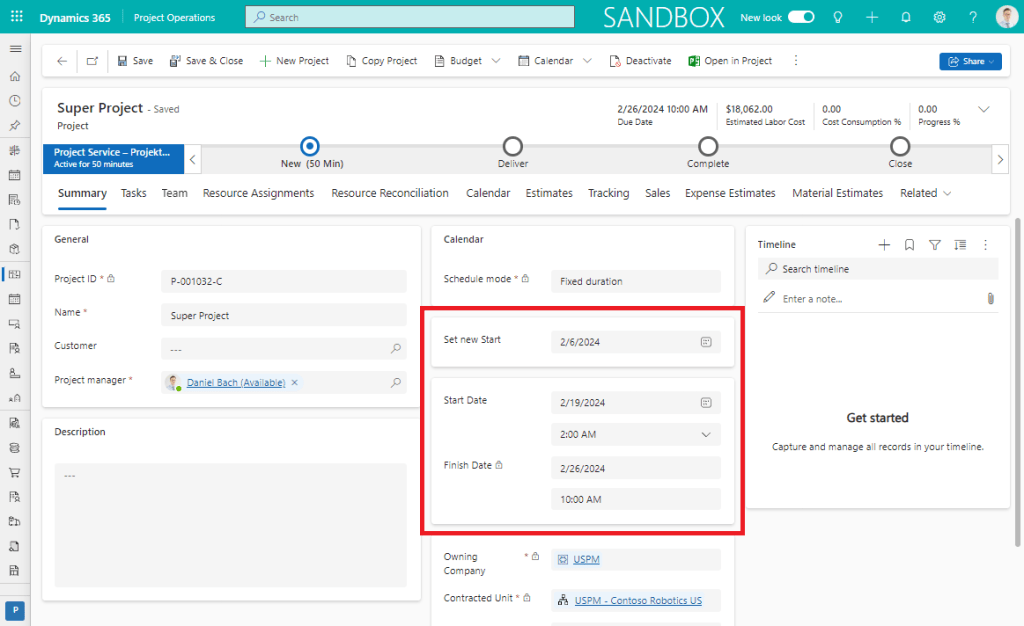
For this i always add a new section where i place the project finish date AND the task earlieststart.
This is my working box for the pm to see the status of project schedule and the scheduled time in his plan.

These fields are totally independent and only based on the WBS facts. This is what we want to see.
As a next step to give it more meaning i am moving the scheduled start to an extra section and call it “Set new Start Date”. Tooltips might help your users as well.

Final Form after the small adjustments made;
Re-schedule
Finally the old re-scheduling is not missing with Project Operations. Our main focus is the scheduledstart field.
When we set a new “target” date and save the project, the complete project plan will be recalculated. This will include all the dependencies between tasks and also the start on in-dependent tasks.
In our example i do not adjust the start of task 1 and task 4, instead in would only set at new start date for the whole project. Every task will be moved and the dependencies are used as well.
So lets go sample. “Current” Plan:
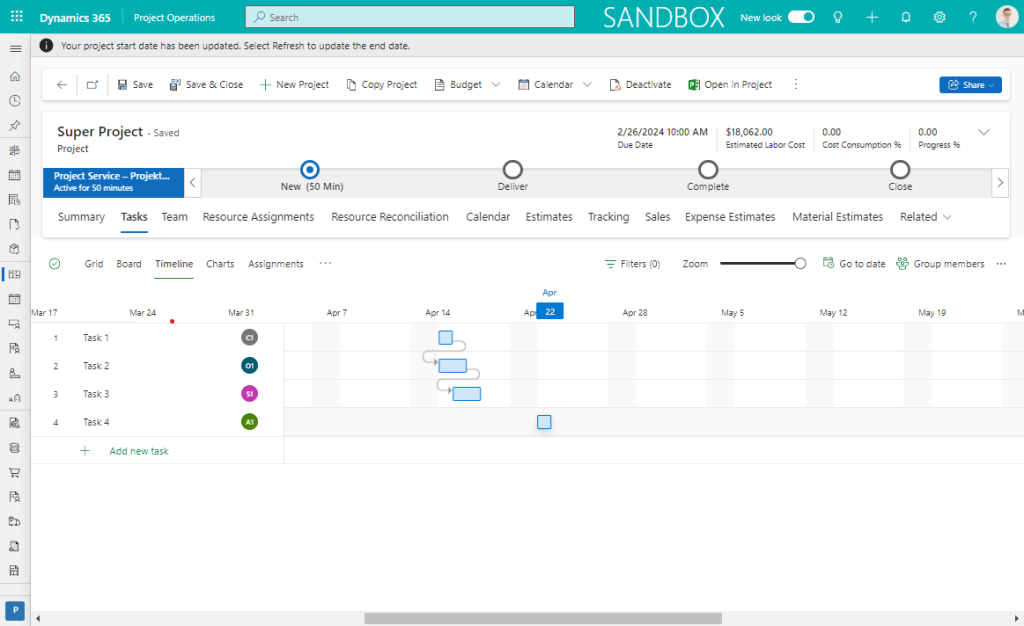
Go to the Summary page and set the next project start to be mo 15. apr. and save the project.
Next there will be a notification displayed that rescheduling is taking place. Just wait. When it is completed,
go to the schedule again, and TADA
Summary
When it is required to postpone a project and re-schedule its complete startdate, it is the most easy way using “scheduledstart” instead of moving every task by hand.
 365 Power